Skip to content

Optional analytics and Meta ad cookies only if you accept. Cookie policy

Table bookings

Every booking in one diary. Every allergy at the pass.

Guests book on your website or Google, pay a deposit and declare their allergies. The kitchen acknowledges each allergy before service, the host seats the party and a no-show is settled in one tap. Phone bookings and walk-ins land in the same diary, so nothing is copied twice.

  • No booking or cover fees from Misenta
  • Deposits paid into your own Stripe account
  • Allergies acknowledged by the kitchen

Pro from NZ$99 a month for your first location

14 days free · no card · Online booking is in the free trial. Deposits start on a paid plan.

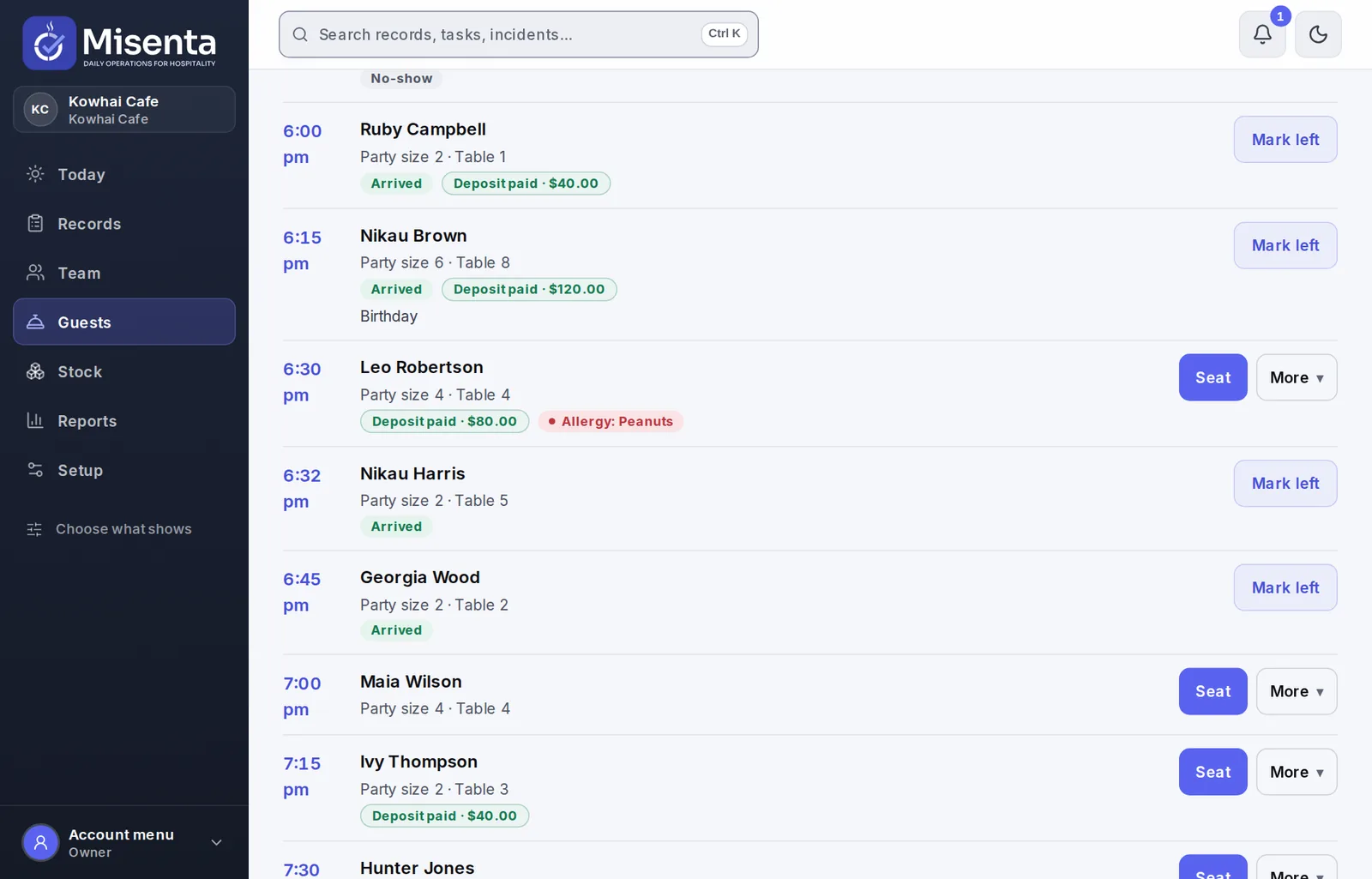
Tonight's diary at Kowhai Cafe: each party's time, size and table, deposits paid, a no-show and red allergy badges.
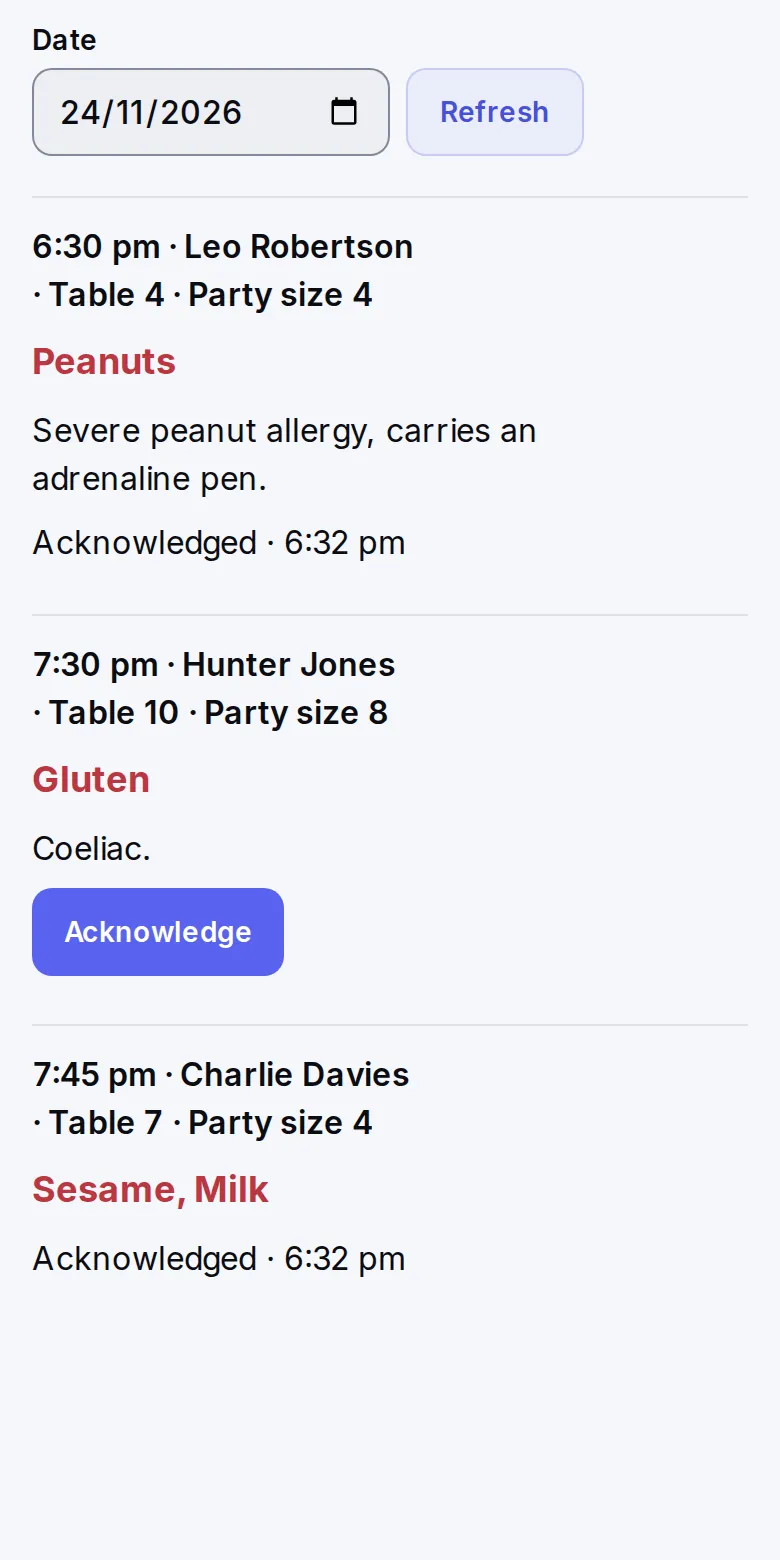
The kitchen's allergy hand-off on a phone: tonight's tables with declared allergies, two acknowledged and a party still waiting for the kitchen.
Tonight's diary at Kowhai Cafe, and the kitchen's allergy hand-off on a phone. Made-up business.

One evening, from booking to seated

An example evening at Kowhai Cafe, a made-up 40-cover cafe, as its guests and team see it in Misenta. Every picture is the app itself; the times show the order things happen in.

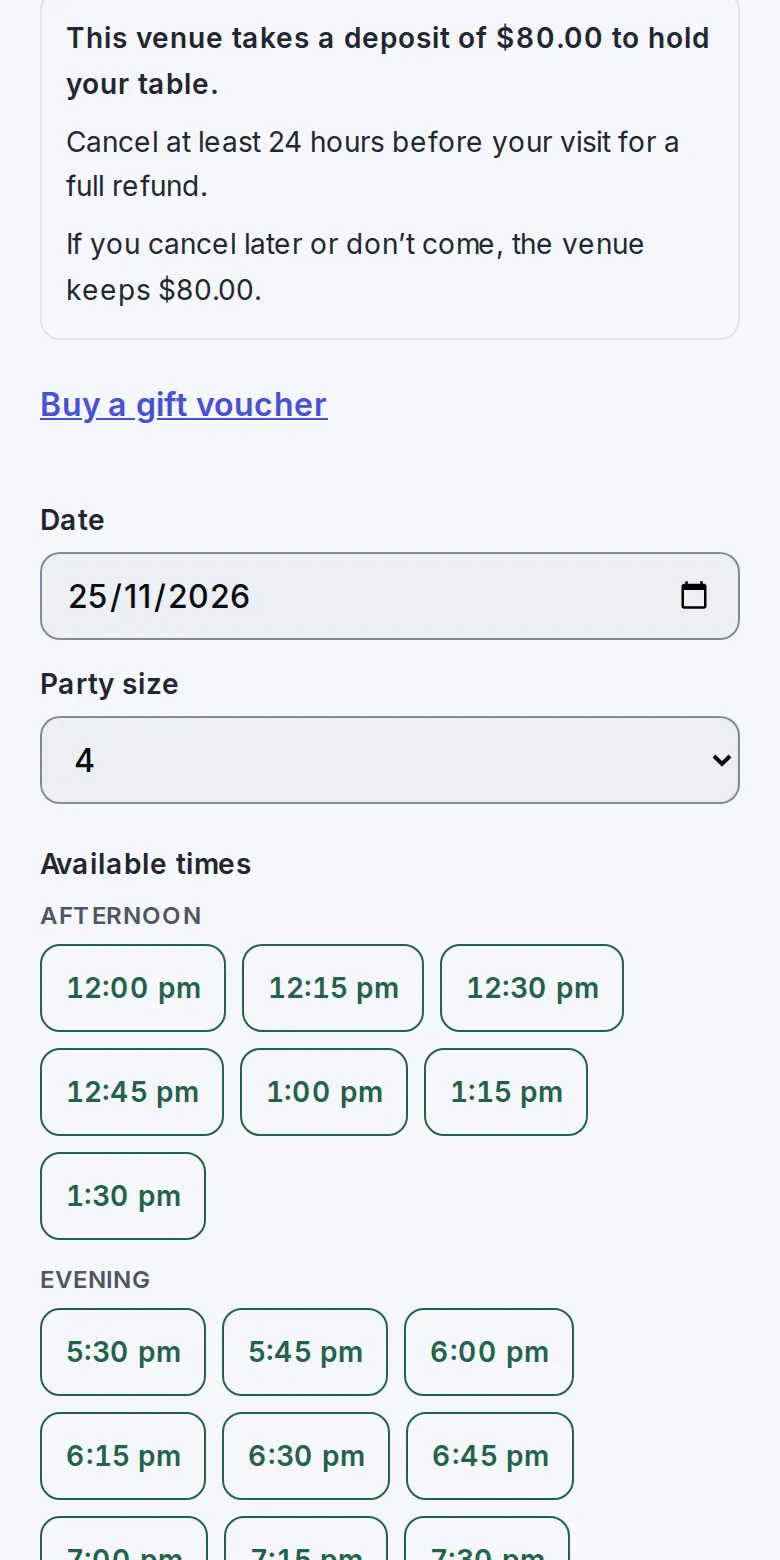
    1. Kowhai Cafe's booking page on a phone: the deposit it takes to hold a table, the date, the party size and the times still free.
      Pro

      Two days before · 2:02 pm

      A guest books on your website

      Your booking page shows only the times you can seat for the party size chosen, and the deposit before anything is paid. Put the link behind your website's button, on Google or on a printed QR card.

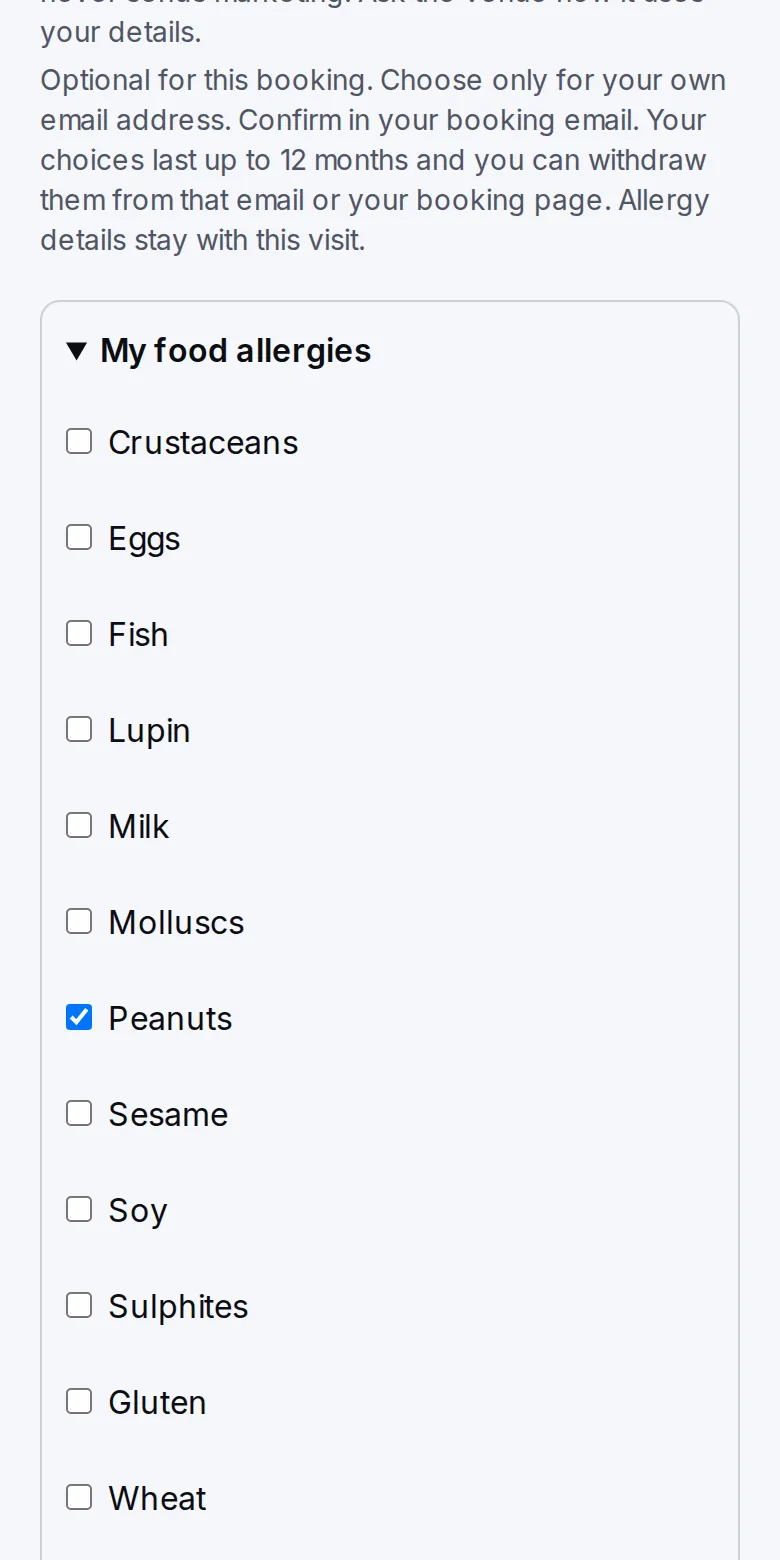
    2. The allergy part of Kowhai Cafe's booking page on a phone: the allergens the law names, with peanuts ticked.
      Pro

      Two days before · 2:04 pm

      They declare an allergy and pay the deposit

      The guest ticks their allergies from the allergens New Zealand food law lists and agrees to share them for this visit. The deposit goes straight to your own Stripe account, with the amount you keep for a no-show shown before they pay, and the confirmation follows.

    3. The kitchen's allergy hand-off on a phone: tonight's tables with declared allergies, two acknowledged and a party still waiting for the kitchen.
      Pro

      On the night · 5:30 pm

      The kitchen acknowledges it

      The kitchen's allergy sheet names the guest, the table and the time. The alert stays open until the kitchen taps Acknowledge, and the kitchen is asked again if the booking changes.

  1. Pro

    On the night · 6:00 pm

    Front of house sees the whole evening

    The diary shows each party's time, table, deposit and allergy. Seat a party, move it, join tables for a large group or add a walk-in, from a laptop or a phone.

    Tonight's diary at Kowhai Cafe: each party's time, size and table, deposits paid, a no-show and red allergy badges.
  2. Operations

    On the night · 6:55 pm

    The host seats them

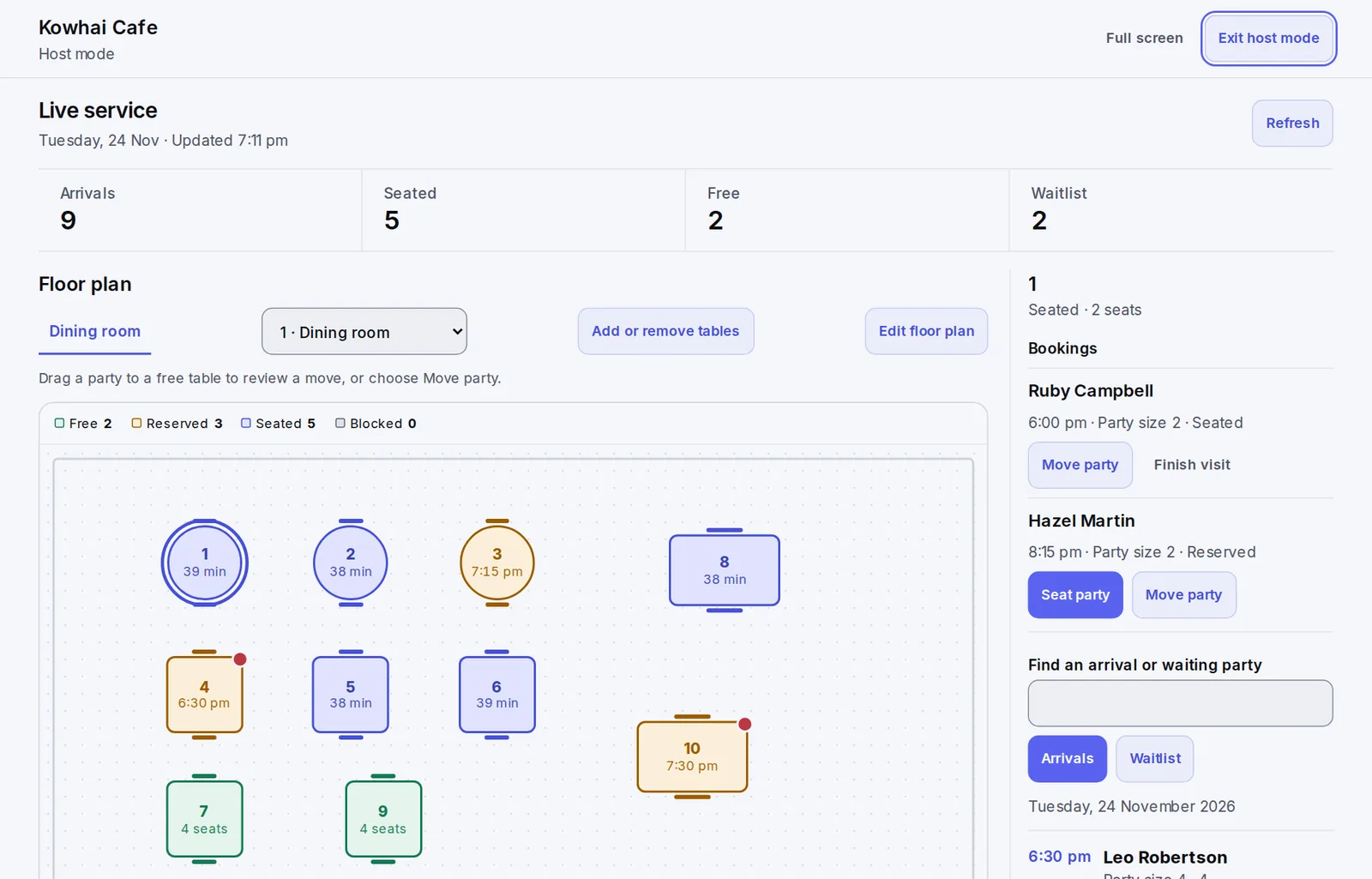
    Host mode puts tonight's arrivals, free and seated tables and the waiting list on one screen, with the allergy on the table before the party sits down.

    Host mode at Kowhai Cafe during service: arrivals, seated and free tables and the waiting list above the floor plan, with the next parties to seat.
  3. Operations

    On the night · 7:02 pm

    A late table is flagged

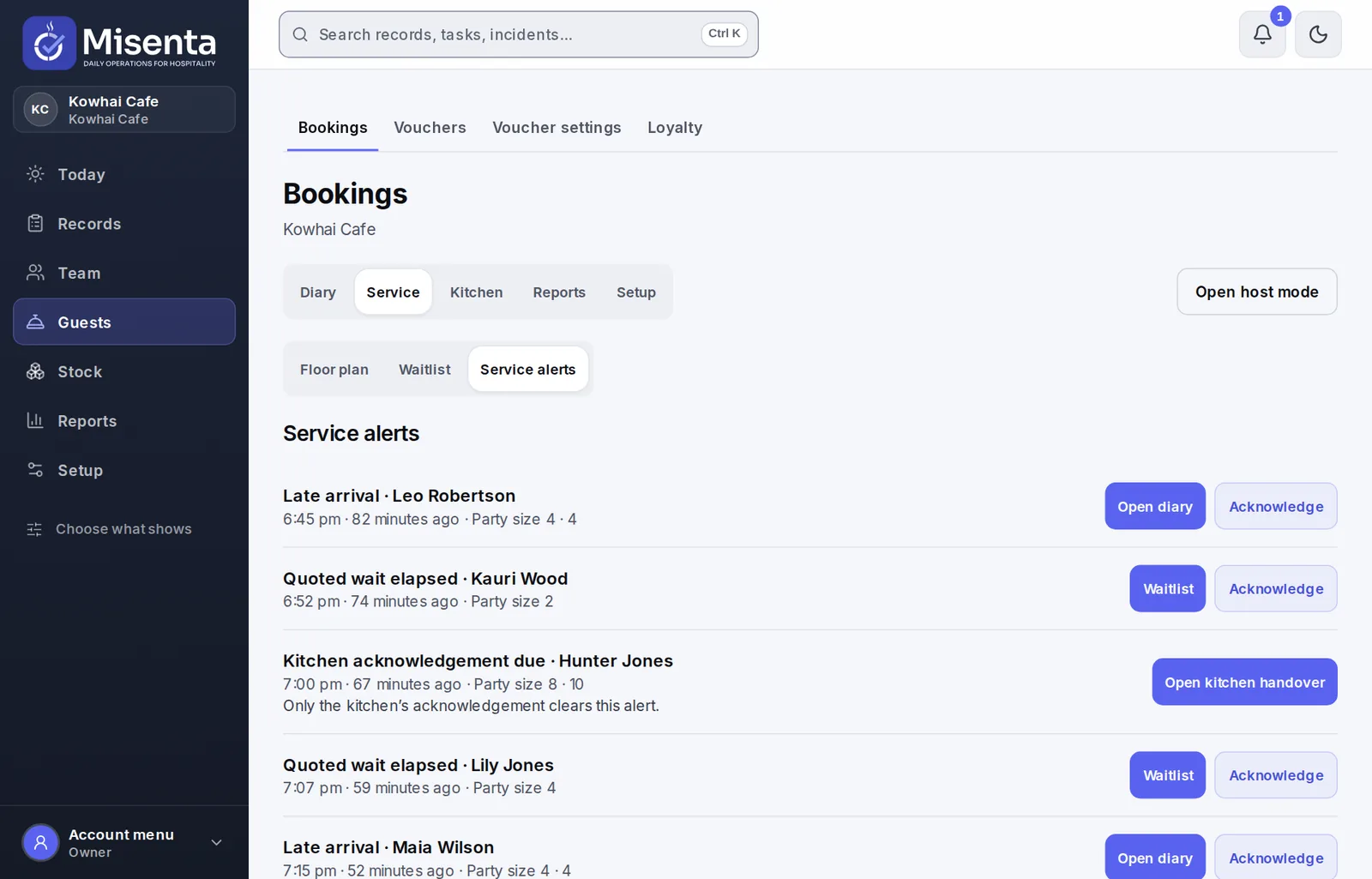
    Service alerts show late arrivals, tables running over and waits past the time you quoted, and any allergy the kitchen still has to acknowledge, each with the action to take.

    Service alerts at Kowhai Cafe: late arrivals and a kitchen acknowledgement still due, each with the action to take.
  4. Pro

    On the night · 9:30 pm

    A no-show is settled in one tap

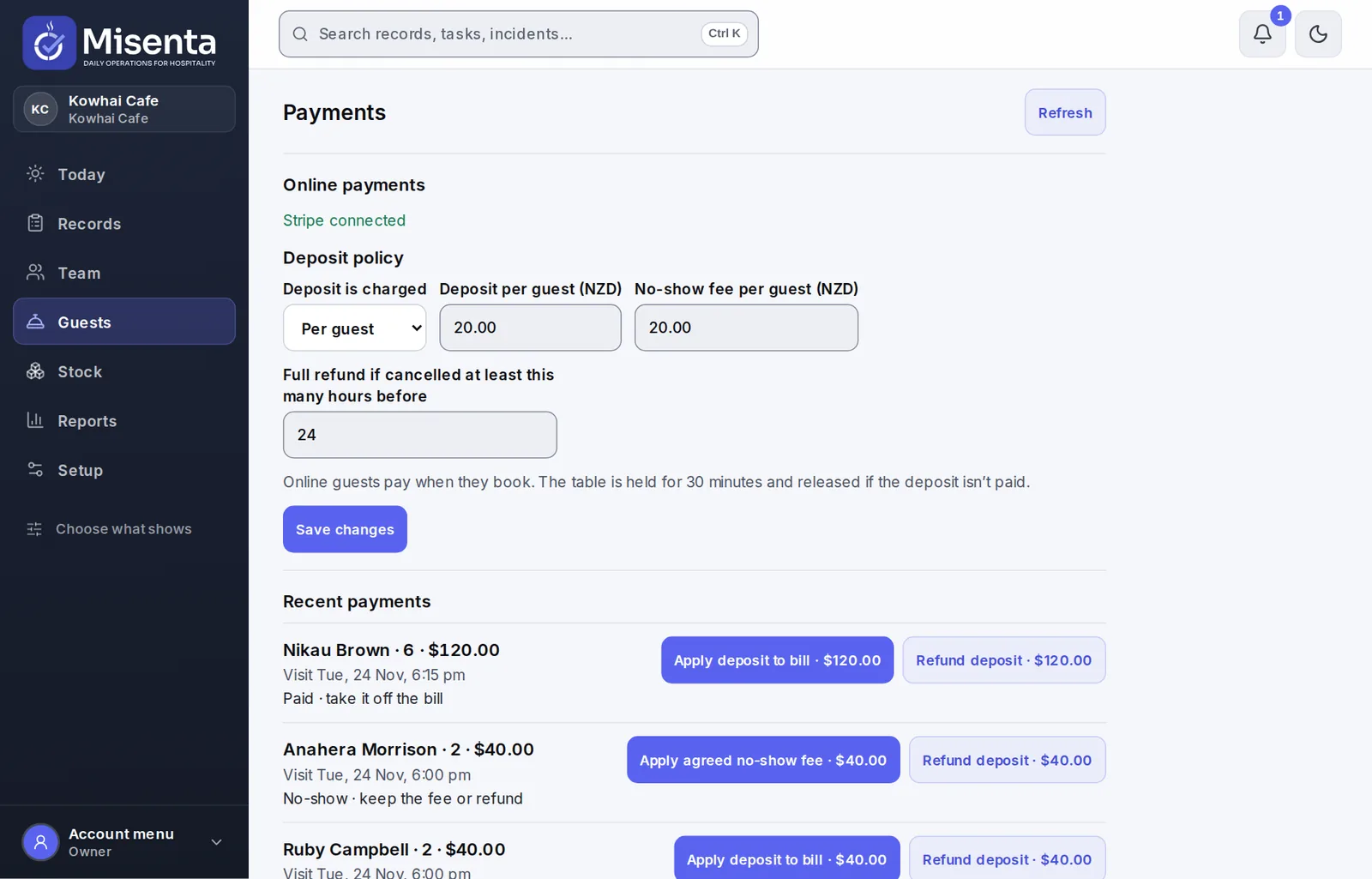
    Mark a no-show once the booking's start time has passed. Keep the fee the guest agreed to, or refund the deposit, from the booking's payment.

    Kowhai Cafe's deposit policy per guest and tonight's deposits, with a no-show's agreed fee ready to keep or refund.
  5. Pro

    Next morning · 9:00 am

    You see how the week went

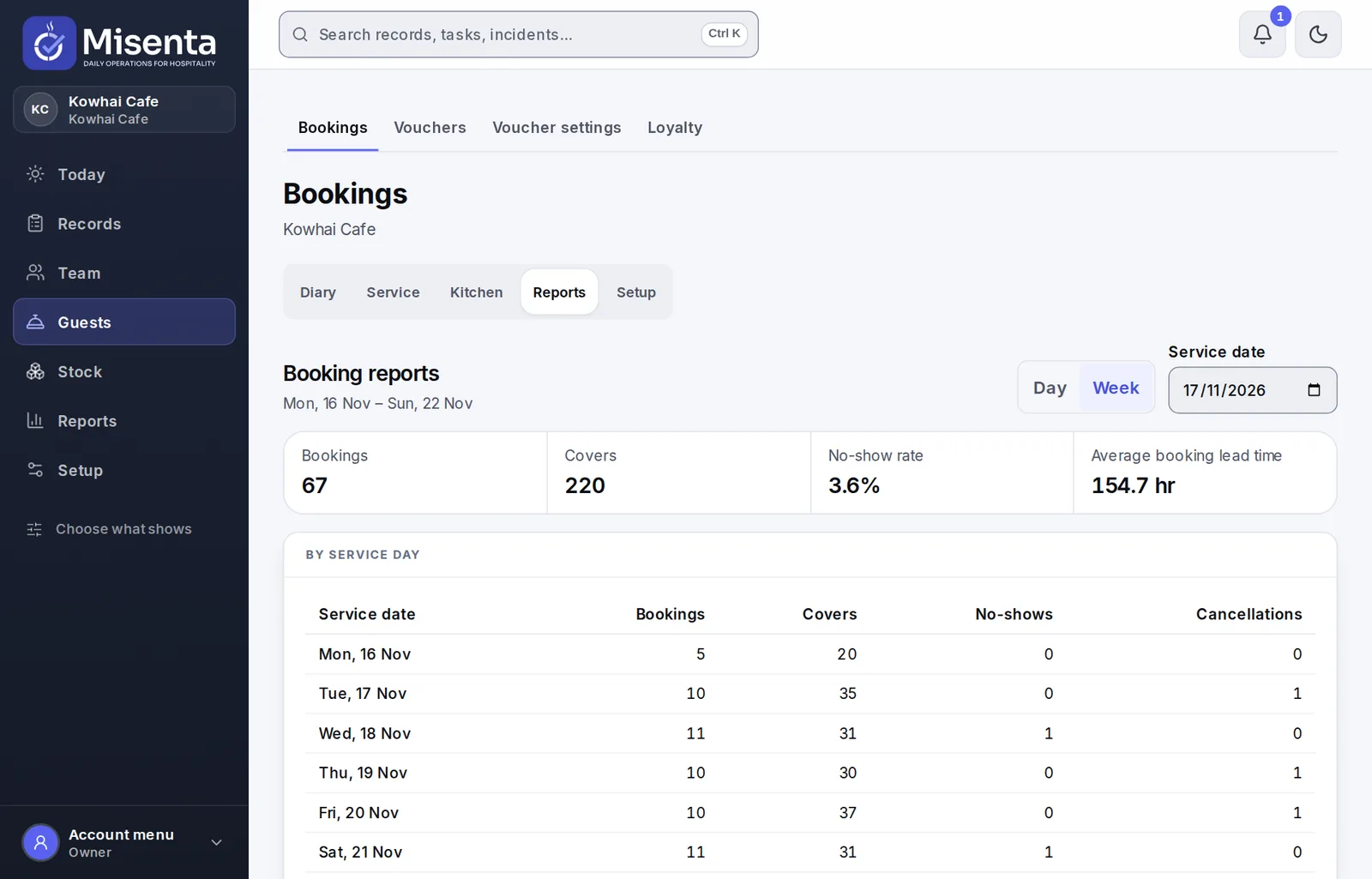
    Bookings, covers and no-shows by day or week, how far ahead guests book and where bookings came from: your website, Google, a QR code, the phone or the door.

    Last week's booking report: bookings, covers, the no-show rate and how far ahead guests booked, day by day.

A week at Kowhai Cafe

The made-up cafe's own week, read from Misenta's booking report and diary.

16 November – 22 November

Kowhai Cafe

  • Bookings67
  • Covers220
  • No-show rate3.6%
  • Deposits for tonight$960.0012 bookings paid a deposit

Covers by day, last four weeks

Covers by day, last four weeks
  • Mon 26: 15 covers
  • Tue 27: 36 covers
  • Wed 28: 33 covers
  • Thu 29: 29 covers
  • Fri 30: 35 covers
  • Sat 31: 32 covers
  • Sun 1: 35 covers
  • Mon 2: 15 covers
  • Tue 3: 33 covers
  • Wed 4: 32 covers
  • Thu 5: 35 covers
  • Fri 6: 31 covers
  • Sat 7: 36 covers
  • Sun 8: 39 covers
  • Mon 9: 16 covers
  • Tue 10: 29 covers
  • Wed 11: 36 covers
  • Thu 12: 37 covers
  • Fri 13: 32 covers
  • Sat 14: 31 covers
  • Sun 15: 38 covers
  • Mon 16: 20 covers
  • Tue 17: 35 covers
  • Wed 18: 31 covers
  • Thu 19: 30 covers
  • Fri 20: 37 covers
  • Sat 21: 31 covers
  • Sun 22: 36 covers

Tonight's covers by hour

Tonight's covers by hour
  • 12 pm: 6 covers
  • 1 pm: 12 covers
  • 2 pm: 0 covers
  • 3 pm: 0 covers
  • 4 pm: 0 covers
  • 5 pm: 4 covers
  • 6 pm: 16 covers
  • 7 pm: 18 covers
  • 8 pm: 10 covers
  • 9 pm: 2 covers

Where bookings came from, last four weeks

  • Website button80
  • Google42
  • QR code26
  • Phone83
  • Walk-in37

Example venue: a made-up 40-cover cafe with synthetic bookings, set up in Misenta for these pictures. Not a customer's figures.

Switching from another booking system

Export your upcoming bookings from your current booking system as a CSV file and import them into the diary: Misenta reads the usual column names (reference, date and time, guest, party size, email and phone), and checks each row before anything is added, up to 100 bookings a file. Your old system can keep running until the last imported booking has been and gone.

Which plan has it

Core and Pro start with 14 days free and no card. Operations has no free trial: you choose it yourself, monthly, with no contract.

Pro

NZ$99a month

for your first location, with unlimited staff

NZ$36 for each extra location

  • Your booking page on your website, Google and a QR card
  • One diary for online, phone and walk-in bookings
  • Deposits and no-show fees, paid into your own Stripe account
  • Allergies passed to the kitchen and acknowledged
  • Guests change or cancel from their confirmation
  • Booking reports, and imports of a CSV export from your current booking system
Start free trial

14 days free · no card

Operations

NZ$179a month

for your first location, with unlimited staff

NZ$48 for each extra location

Everything in Pro, and:

  • Host mode with the floor plan
  • Waiting list and service alerts
  • Returning guests and a no-show estimate
  • Covers on the roster
  • Gift vouchers sold on your website
Get Operations

No free trial. Monthly, no contract.

On Core you can try the diary in practice mode first: practice bookings never reach a guest.

What Misenta costs, in plain words

Prices are per month, in your currency, with unlimited staff.

Your plan
Pro, NZ$99 a month for your first location and NZ$36 for each extra one; Operations, NZ$179 and NZ$48, adds host mode and the floor plan
Per booking or cover
Nothing: no commission and no fee per booking or per cover
Deposits
Paid into your own Stripe account; only Stripe's standard card fees apply
Contract
Monthly, with no contract: cancel any time

Questions owners ask

Do you charge per booking or per cover?

No. Misenta adds no booking, cover or commission fee. Deposits are paid into your own Stripe account, where Stripe's standard card fees apply.

Can I take deposits and keep a fee for no-shows?

Yes, on Pro. Ask for a deposit per guest or per booking, set the most you keep for a no-show and the refund window. Guests see both amounts before they pay. Deposits start on a paid plan, so they are not part of the free trial.

How do allergies reach the kitchen?

The guest ticks their allergies from the allergens New Zealand food law lists on your booking page. The allergy shows on the booking, the floor plan and the kitchen's allergy sheet, with the dishes on your published allergen matrix that contain it, and stays open until the kitchen acknowledges it. Allergy details are deleted after the visit.

What happens when a guest doesn't come?

From the booking's start time you can mark a no-show. You then keep the fee the guest agreed to, or refund the deposit, from the booking's payment. Late arrivals show as service alerts on Operations.

Can I bring my bookings from my current system?

Yes. Import upcoming bookings from a CSV export of your current booking system, so nothing is typed twice.

What if the phone loses signal during service?

Open today's diary while you are connected and the phone keeps a saved list for service. Arrivals, seating and no-shows recorded on the host phone are sent when the connection is back. New bookings, changes of date or table and payments need a connection.

Can staff take bookings by phone?

Yes. Phone bookings and walk-ins go into the same diary, with the table, party size, occasion and any allergy the guest agrees to share. The kitchen sees that allergy just as it sees one from an online booking.

What is in the free trial?

Core and Pro come with 14 days free and no card. You can take real online bookings in the trial; deposits start on a paid plan. Host mode, the floor plan, the waiting list and gift vouchers are on Operations, which has no free trial and which you choose yourself in the app's billing page.

Who looks after guests' data?

Your venue is in charge of its guests' data. Guests agree before sharing allergies, which are used for that visit only and deleted after it. Guest contact details are deleted after 30 days.
Gift vouchers

What owners say

From cafes in Edinburgh, United Kingdom.

Daily checks are right there on their phones every morning, temperatures take seconds, and nothing gets lost between shifts. When the EHO turned up, I had a clean, time-stamped record ready in minutes — not a folder to dig through.
Cafe Vera logo

Cafe Vera

Owner

Edinburgh, UK

Read their story
The rota is the part I use most — I plan the week once and everyone can see their shifts on their phone. And the records side means every check and temperature is logged properly, so it’s all there when I need it.
Mørn Coffee logo

Serkan

Owner, Mørn Coffee

Edinburgh, UK

It makes the day-to-day easier to manage.
Toastology logo

Huseyin

Owner, Toastology

Edinburgh, UK

Visit Toastology (opens in a new tab)

Take your first booking tonight

Set your hours and tables, share your link and see the next booking land in the diary.

14 days free · no card